
Clearer inventory decisions
across the store network
Sandia Oil needed a clearer view of sales, inventory, and spoilage across its stores. Our team brought records from existing systems into one place and built dashboards to help managers compare locations, investigate waste, and see what needs attention.
Overview
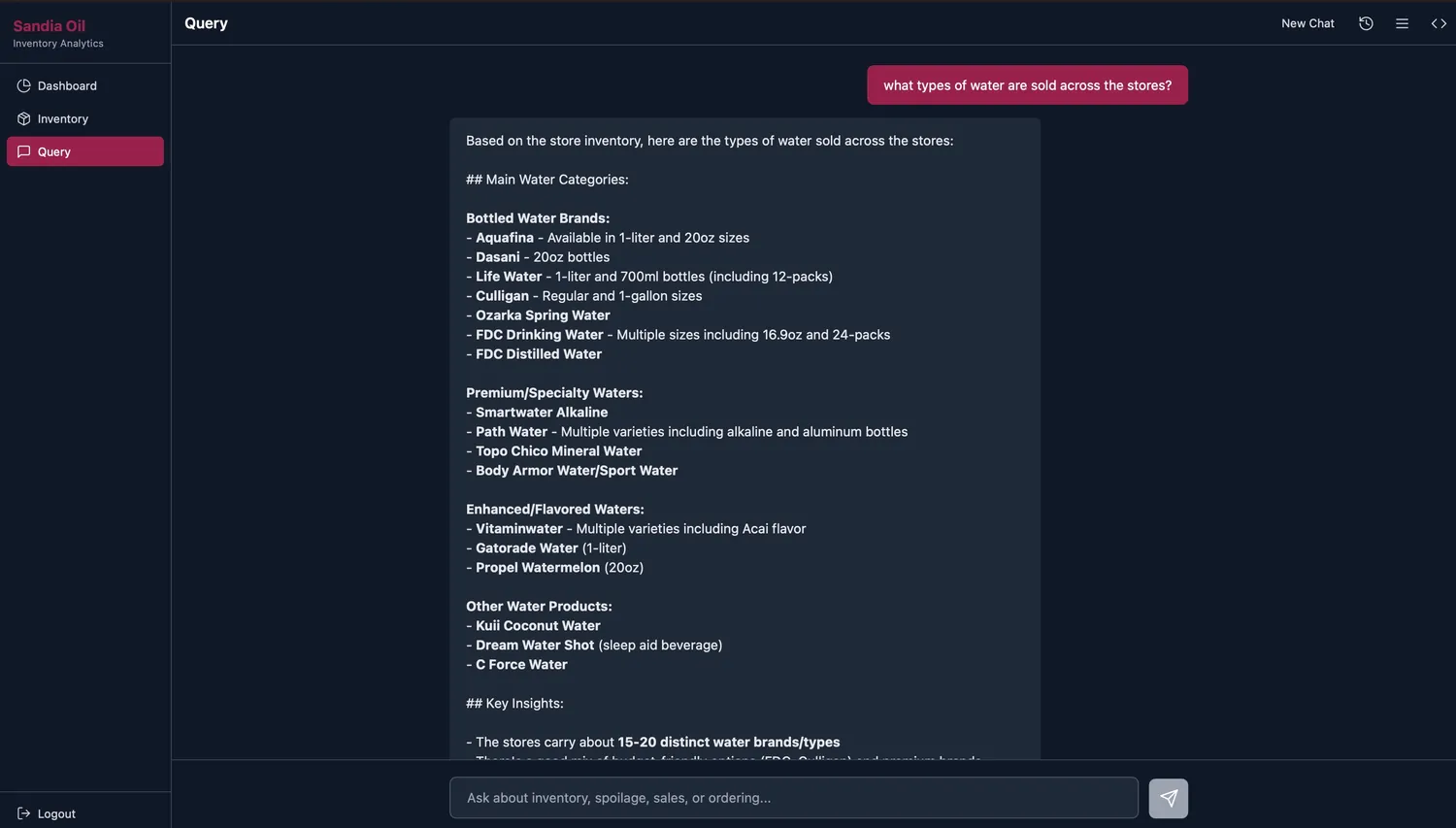
Sandia Oil operates gas station convenience stores across New Mexico and Arizona. Sales, purchasing, inventory, and waste records were difficult to combine because they arrived in different file formats. Our team built a shared reporting application that brings those records together. Managers can investigate spoilage by item and store, compare locations, and explore the data through dashboards and a plain-English query interface.
The Challenge
Managers needed a consistent way to compare stores and investigate inventory losses. That required bringing historical files together, making product identifiers comparable, and presenting the information in views people could use in their day-to-day decisions.
The source files included fixed-width text, spreadsheets, and RTF documents. Details such as leading zeros in product codes mattered when matching records. We built the import and reporting workflow within Sandia’s existing AWS environment.
Our Approach
We worked from the source records outward, connecting file intake, consistent data, application access, and useful reporting views.
1. Bring the records together
Set up file intake in Sandia’s AWS environment. Organized incoming records by data type and built a repeatable route from source files into the reporting system.
2. Make the data comparable
Built loaders for sales, purchases, inventory, and waste. Standardized the records in PostgreSQL while handling product codes, dates, and differences between file formats.
3. Give the team access
Built a web application with account access, reporting endpoints, and saved conversations. Managers can work with the same underlying records through a shared interface.
4. Show what needs attention
Added views for spoilage, sales trends, item comparisons, and store performance. A plain-English query interface provides another way to explore the imported records.
Key Deliverables
File intake
- Organized upload locations by data type
- Import tools for existing file formats
- Product and date handling
- Documentation of source-field mappings
Shared database
- Connected sales and purchasing records
- Inventory and spoilage tables
- Documented data structure and queries
Web application
- Account access for the team
- Plain-English query interface
- Saved conversation history
- Store and item reporting views
Management dashboards
- Spoilage amounts, rates, and trends
- Store and department comparisons
- Item-level inventory analysis
- Shareable date and location filters
Deployment
- Infrastructure defined in Terraform
- Application and database hosted on AWS
- Repeatable deployment workflow
What the system makes possible
Imported transaction records available for analysis
Plain-English questions alongside dashboard views
Sales, inventory, and spoilage in a shared application
Product-level records support closer investigation
Spoilage comparisons by store and department
Location filters make cross-store review possible
Managers can investigate sales, stock, and spoilage using the same underlying records. Store comparisons and item-level views help them identify where to look more closely. The application makes the information easier to use when reviewing orders, waste, and operating performance.
Technologies Used
Still piecing together the numbers?
If your team spends more time assembling reports than using them, we can help. We connect the records you already have and build views around the decisions your business needs to make.